
 Laura Haase
What's New in Hololight Stream 2026.1.0.0
 Phillipp Landgraf: Oct 8, 2026
Hololight Stream version 2026.1.0.0 is available. It is a broad release, with work going into stability, connection quality and the everyday...
"Spatial computing" has become the dominant term for what many teams already know as XR, AR, or immersive technology. Its rise reflects a real shift in how computing is described: away from systems that present information on flat screens, toward systems that understand and work within three-dimensional physical space.
In enterprise and industry contexts, spatial computing and XR are often used to describe the same deployments. This guide explains what the term means in plain English, how the technology works, and where industrial teams are already putting it to use.
What you will learn:
What spatial computing involves
| Component | What it means in practice | Why it matters for industrial teams |
|---|---|---|
| Sensing and spatial mapping | The system reads the physical environment and establishes the user's position within it | Digital content stays anchored to real objects and locations as people move |
| 3D rendering and content | Detailed 3D models are generated and displayed at real-world scale | Teams can review a full-size design before anything is physically built |
| Natural interaction | Users work with content through hands, gaze, or controllers rather than a mouse and keyboard | Interaction mirrors how people handle physical objects, lowering the learning curve |
| Hardware and devices | The experience is delivered through AR or VR headsets suited to the task and environment | Device choice can be matched to the workflow, the user, and the safety needs of the space |
| Compute and delivery | Rendering can run centrally on servers or in the cloud and stream to the headset | High-fidelity 3D need not be limited by the processing power of the device in your hands |
| Data handling | Sensitive 3D data can be processed and kept in a controlled environment rather than on the end device | When rendering is handled centrally, organizations can retain control of confidential design files |
Spatial computing is computing that understands and works in three-dimensional space. The system senses the physical environment around the user, places digital content into that environment at the correct position and scale, and lets people interact with it as if it were really there.
The phrase gained wide prominence when Apple used it to describe the Vision Pro headset1, and it has since become a common label for the category across the industry2. In enterprise settings it is frequently used interchangeably with XR and AR/VR. The practical meaning stays consistent: using spatial awareness and 3D content to give people a more direct way to work with complex data and physical environments.
Augmented reality, virtual reality, and extended reality are the technologies through which spatial computing is delivered. AR layers digital content onto your view of the real world, VR replaces your surroundings with a digital environment, and XR is the umbrella term covering both and everything between. For a fuller explanation of those terms, see our beginner's guide to AR, VR, and XR in industry.
| Term | What it means | How it relates to spatial computing |
|---|---|---|
| Spatial computing | Computing that understands and works in 3D physical space | The overall paradigm, often used interchangeably with XR in industry |
| Augmented reality (AR) | Digital content layered onto your view of the real world | One of the delivery technologies for spatial computing |
| Virtual reality (VR) | A fully digital environment that replaces your surroundings | One of the delivery technologies for spatial computing |
| Extended reality (XR) | The umbrella term covering AR, VR, and everything between | Frequently used interchangeably with spatial computing in enterprise contexts |
| Digital twin | A 3D digital replica of a real object, space, or process | A common spatial computing application in industry |
Spatial computing works as a continuous loop. The system senses the physical environment and maps the user's position within it. 3D content is rendered and anchored into that space, updating in real time as the user moves. Within that live environment the user interacts with the content through hand gestures, gaze, or controllers, and the process begins again.

The more detailed the 3D content, the more rendering power the loop demands. This is a practical constraint for enterprise teams, because high-complexity models can exceed what a standalone headset can process on its own. Hololight's XR pixel streaming technology addresses this by handling the heavy rendering centrally on a server or in the cloud and streaming the result to the headset as pixels, so the end device displays the output without running the computation itself.
For applications that demand even greater spatial precision, additional tracking infrastructure can be layered on top. The Hololight, ART, and LP-Research partnership combines ART's high-accuracy infrared tracking with LP-Research's motion refinement algorithms to eliminate jitter and reduce latency further than standard headset tracking allows, while Hololight's streaming technology delivers the rendered scene in real time. The result is a setup suited to high-stakes scenarios such as precision prototyping and technical development, where positional accuracy cannot be approximate3.

Spatial computing is most valuable wherever teams work with complex 3D objects, physical spaces, or both. In industry, the most common applications are design and engineering review, secure collaboration on detailed models, training and simulation, and field service.
Design review is one of the clearest entry points. Instead of working from drawings or a model on a screen, a team can place a full-scale version of a design into a real space and walk around it together. A previous model can be overlaid onto a real machine at 1:1 scale to make changes visible and discussable on-site, and in a production handover, two versions can be compared directly so that step-by-step differences become immediately clear to everyone in the room. ENGIE Refrigeration demonstrates both workflows in practice4.
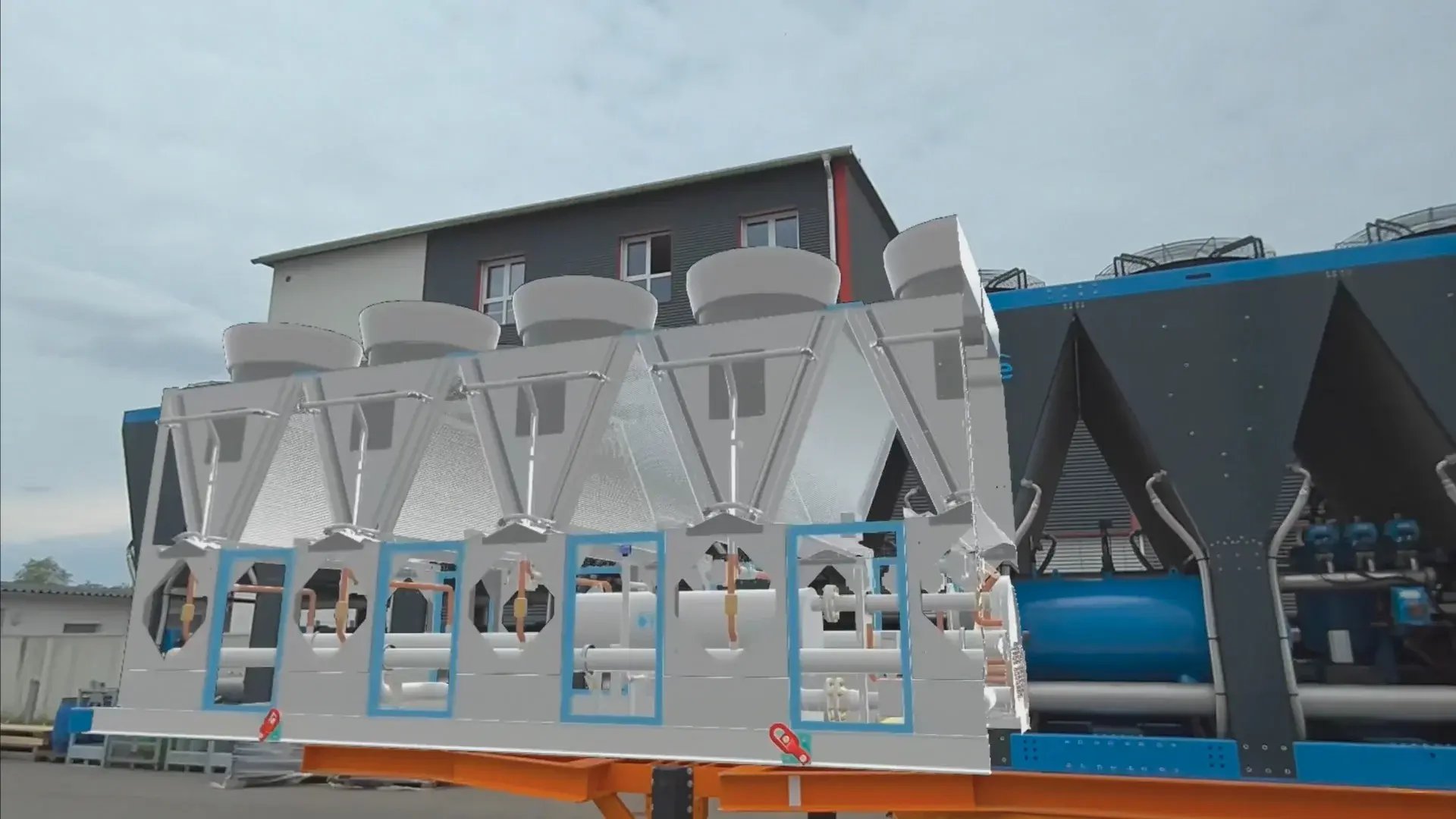
At ENGIE Refrigeration, the virtual model of the old version can be precisely overlaid onto the real machine with AR.
When the design data is sensitive, as it usually is in automotive, aerospace, and defense, rendering the model centrally means only the visual output reaches the headset, so the underlying files can stay within the organization's own environment.
| Application Area | What teams do | Example in practice |
|---|---|---|
| Design review and installation planning | Validate full-scale models on-site before anything is built or delivered | ENGIE Refrigeration visualizes 1:1 models in real environments to check clearances, compare design versions on-site, and hand over to production with full spatial clarity4 |
| Faster, multi-site review cycles | Bring distributed teams into a single review of the same full-detail model | Genesis Design Studios cut design review time from about 40 hours to 25 hours per review and brings up to three international clients into one session5 |
| Data security at scale | Keep sensitive design files within the organization's own infrastructure | BMW Group kept 100% of sensitive design data within its own infrastructure and saved up to 12 months per development cycle6 |
| Precision tracking environments | Anchor digital content to real objects with high spatial accuracy | The Hololight, ART, and LP-Research partnership uses high-accuracy infrared tracking to keep overlays stable with no trade-off in fidelity3 |
| Defense and mission planning | Visualize real-time operational and terrain data for joint decision-making | Hensoldt's ACOP application delivers an interactive 3D battlefield view through AR headsets, with up to 20 users collaborating on the same operational picture in real time |
For a wider overview of AR and XR applications by industry sector, see "Where Is Augmented Reality Used?"
Adopting spatial computing, whatever term your team uses for it, comes down to matching the technology to a real workflow. The strongest starting points are tasks where 3D scale, spatial context, or real-time location genuinely change the outcome, such as design review, quality inspection, training on complex equipment, or cross-site collaboration on sensitive models.
Three practical questions tend to arise early: device fit, rendering and delivery, and data control. The table below breaks down what each one involves.
| Question | What to Consider |
|---|---|
| Device fit | Which AR or VR headsets suit the specific task and the environment the people using them work in |
| Rendering and delivery | How high-fidelity 3D content, including large assemblies and high-polygon models, will be rendered without hardware becoming a bottleneck |
| Data control | Where sensitive design data is processed and stored, and how access to it is controlled |
The answers to those questions shape most of the architectural decisions that follow. For product development and engineering workflows specifically, our guide on AR in product development covers the full framework: use case selection, device choice, IT integration, and ROI.
 Phillipp Landgraf: Oct 8, 2026
Hololight Stream version 2026.1.0.0 is available. It is a broad release, with work going into stability, connection quality and the everyday...
 Phillipp Landgraf: Oct 1, 2026
Remote rendering and pixel streaming are both used to describe enterprise XR streaming infrastructure, including by vendors and in technical...
 Sandro Sailer: Sep 24, 2026
For most enterprise teams, XR device management means one thing: a way to control their headsets. Mobile device management (MDM) tools like ArborXR,...